Gossamer
How Gossamer works

Your best thinking deserves better than a chat scroll.

AI conversations are where a lot of good ideas happen now, and then they scroll away. Gossamer keeps the conversation and builds something lasting out of it, so what you work out stays worked out.

It started as a complaint.

Gossamer’s founder had been having long conversations with an AI about big questions: consciousness, science, philosophy, faith. The conversations were rich. The chat window wasn’t: everything disappeared into one long scroll, with no structure and no way to find that one idea from three weeks ago.

Saving transcripts led to a homemade archive, and copying things into it by hand got tedious. The obvious fix was to let the AI work inside the archive. That became Gossamer. Then a friend asked to write her dissertation in it, and it stopped being a personal tool.
How it works

A conversation on one side. Your document on the other.

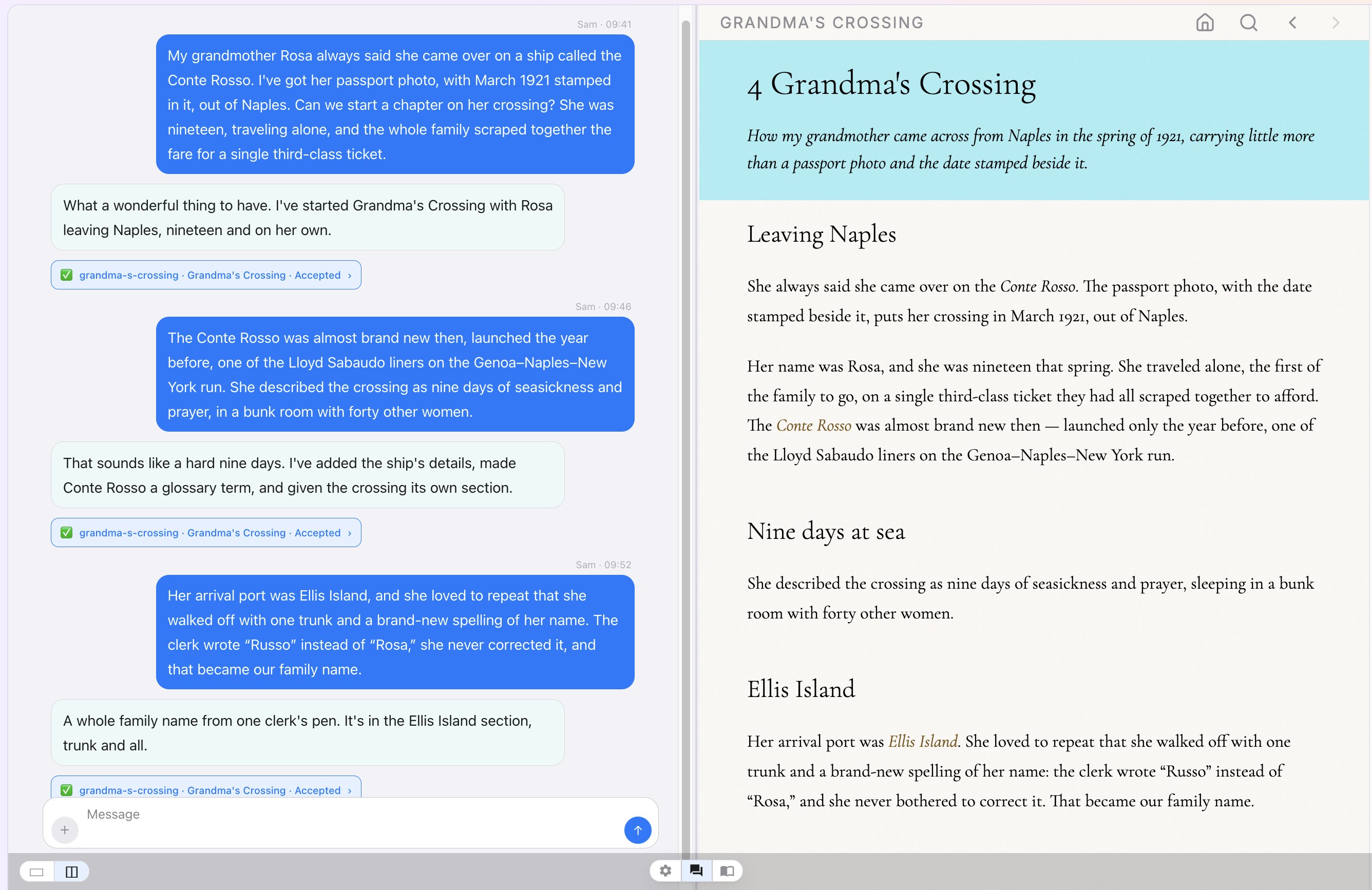
Every project has two views side by side: a chat where the work happens, and a document that grows from it.

A family-history chapter taking shape: the conversation on the left, the document it builds on the right. Click to enlarge.
1

Talk, the way you think

Each project has one ongoing conversation, its working journal. Ramble, jump between topics, pick it back up next month. It’s all still there, and all searchable.

  • Type, paste, or dictate. Dictation runs on your device.
  • Drop in photos and images. They’re stored once and usable anywhere in the document.
  • Bring in what you already have: Word, Pages, PDF, or Markdown files become part of your project.
  • The AI can read and search your whole project mid-conversation, so it works from what you’ve actually written.
2

Watch it become a document

As you talk, the AI drafts and refines the document: chapters, headings, links between ideas, and the bookkeeping nobody enjoys. The page refreshes as changes land.

  • A glossary that builds itself. Mark a term once and it’s linked everywhere it appears.
  • Cross-references, footnotes, and a bibliography, gathered automatically.
  • Full-text search, a table of contents, and your own sections and statuses.
3

Review every change, or don’t

Each change the AI proposes appears in the chat as a small card showing exactly what will be added, changed, or removed. Accept or reject it. If you trust the flow, switch on auto-accept.

  • Full history: every accepted change is recorded, and earlier versions can be restored.
  • Read actively: highlight and comment right on the page, then talk about it in the chat.
What the AI does

Part secretary, part sparring partner.

🗂️

The secretary

You supply the substance; it handles the form. It turns rambling into structure, keeps track of threads you dropped, and finds the passing remark you made weeks ago. It writes the headings, links, and citations so you don’t have to.

💬

The collaborator

It asks clarifying questions, points out connections you hadn’t made, and pushes back when something doesn’t hold together. A good editor, one that makes your thinking sharper rather than smoother.

What people make

One tool, many shapes.

A project can be a few loose notes or hundreds of linked chapters. Gossamer handles the structure, however much you need.

A dissertation or book

Chapters, sources, footnotes, and a glossary that stay consistent as the argument evolves.

A research log

Every reading, hunch, and dead end in one place, searchable and cross-linked.

A personal archive of ideas

The long conversations you’d otherwise lose: philosophy, faith, science, life.

A family project

A shared conversation the whole family can join, with photos and an AI that knows everyone by name.

A group or community

Plans, decisions, and the reasons behind them, kept where everyone can find them.

A memoir or family history

A life story told one conversation at a time, with the photos, names, and dates kept straight.

Everything else

The details that make it trustworthy.

📱

Wherever you are

Apps for iPhone, iPad, and Mac, plus a web version for any browser. Pick up exactly where you left off.

👥

Better together

Invite people to read along or to contribute. Everyone shares the conversation, and you decide which changes land.

🌐

A real website

Your document is a website from day one. Keep it private, share it by secret link (with a password if you like), or publish it for everyone.

📄

In and out, any format

Import Word, Pages, PDF, and Markdown. Export to Word, Pages, PDF, a ready-to-host website, or plain Markdown.

🕰️

Nothing is lost

Conversations are kept for good. Every accepted change is recorded, and mistakes can be undone.

☁️

Nothing to manage

Your projects live safely in the cloud. No setup, no syncing, no files to juggle.

Your work is yours.

Underneath, your document is plain Markdown, the open text format used by writers and developers everywhere. Nothing is locked in a proprietary box.

  • Readable by people, usable by other tools
  • Download the whole project whenever you like
  • Restore or move it by uploading it again
  • The conversation is kept as the record of how the work came to be
Questions

Good to know.

Can I use Gossamer today?

Gossamer is in private beta, and new people join by personal invitation. Join the wait list and we’ll let you know when there’s room.

How is this different from a regular AI chat?

A chat gives you a scroll of replies. Gossamer gives you a lasting, organized document, with chapters, links, a glossary, and sources, that grows from the conversation. You review every change, and the conversation is kept too.

Will the AI change my writing without asking?

Not unless you let it. By default each proposed change waits for your OK. You can turn on auto-accept when you trust the flow, and roll anything back later.

What devices does it work on?

iPhone, iPad, and Mac, through the Gossamer app, and any modern web browser through the web version.

Can I bring in work I’ve already started?

Yes. Import Word, Pages, PDF, or Markdown files, along with your images, and keep going from there in conversation.

Who can see my project?

Only the people you invite, until you decide otherwise. When you’re ready to share, choose Publish… in the project’s settings and pick one of four options:

  • Private: only members of the project can read it.
  • Secret link: Gossamer makes a private web address. Anyone you send it to can read the site without signing in, but it isn’t listed anywhere.
  • Password protected: the same secret link, plus a password you choose.
  • Public: anyone can read it, and it appears on the Gossamer home page.

You can change your mind anytime. Setting a project back to Private switches its secret link off for everyone at once; if you share by link again later, you get a brand-new one. Readers can only read. Editing and the conversation stay with the people you invite.

Can I get my work out?

Yes, anytime: as Word, Pages, PDF, a ready-to-host website, or the plain Markdown source.